
六軸機械臂搬運仿真(機器人工具箱)

1、建立機械臂模型 工作臺、貨物
clear
close all
clc
L(1)=Link('d', 0.33, 'a',0 , 'alpha', pi/2,'offset',pi);
L(2)=Link('d', 0, 'a', 0.26, 'alpha',0,'offset',pi/2);
L(3)=Link('d', 0, 'a', 0.02, 'alpha',pi/2,'offset',0);
L(4)=Link('d', -0.29, 'a', 0, 'alpha',pi/2,'offset',0);
L(5)=Link('d', 0, 'a', 0, 'alpha',pi/2,'offset',0);
L(6)=Link('d', 0.07, 'a', 0, 'alpha',0,'offset',0);
L(1).qlim=[-170*pi/180 170*pi/180];
L(2).qlim=[-110*pi/180 120*pi/180];
L(3).qlim=[-122*pi/180 280*pi/180];
L(4).qlim=[-190*pi/180 190*pi/180];
L(5).qlim=[-120*pi/180 120*pi/180];
L(6).qlim=[-360*pi/180 360*pi/180];
robot=SerialLink(L,'name' , '六軸機械臂');
robot.display(); %顯示建立的機器人的DH參數
robot.teach;
%%
% vertice=[-0.2 -0.25 0.05;-0.2 0.25 0.05;-0.3 0.25 0.05;-0.3 -0.25 0.05;...
% -0.2 -0.25 0.05;-0.2 0.25 0.05;-0.3 0.25 0.05;-0.3 -0.25 0.05];
% face=[1 2 3 4;1 2 6 5;1 4 8 5;2 3 7 6;3 4 8 7];
% patch('Vertices',vertice,'Faces',face,'FaceColor',[0.82 0.71 0.55]);
% %調用方法很簡單,第一個參數是長方體的原點,第二個參數是長寬高,輸入命令:
PlotCuboid([0.1,-0.75,-0.2],[1,1.5,0.2],5)%定義工作臺
% PlotCuboid1([0.1,-2,0.2],[1,3,0.2])%定義運輸工具件
gx=0.43;gy=-0.3;gz=0.1;
centerLoc=[gx,gy,gz];
edgeLen=0.2;
thisColor='black';
plot3Cube(centerLoc,edgeLen,thisColor);
view(50,30)
axis equal
```
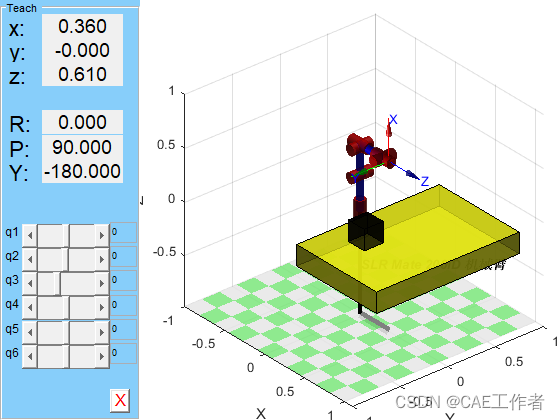
2、仿真運動代碼
%軌跡規劃
%第一機械臂第一段軌跡
robot.plot([0,0,0,0,0,0])%繪制機器人模型
q1=[0,0,0,0,0,0];
T1=transl(gx,gy,gz+0.1)*trotx(pi)%起點
q2=robot.ikunc(T1);
% qt=robot1.fkine(qt1)
% robot1.plot(q1)
[qt1,qt2,qt3]=jtraj(q1,q2,50);%利用五次多項式函數軌跡規劃
hold on
robot.plot(qt1, 'trail','-b')
qt=robot.fkine(qt1)
T11=transl(qt);
plot3(T11(:,1),T11(:,2),T11(:,3) ,'-b');%輸出末端軌跡
其他運動過程代碼見付費內容
3、仿真運動視頻如下:

或者仿真源代碼下載可聯系扣扣2386317960
以下內容為付費內容,請購買后觀看
六軸機械臂軌跡規劃搬運仿真代碼


工程師必備
- 項目客服
- 培訓客服
- 平臺客服
TOP


